
Introduction- by Wired Geekz
Creating a productive workspace doesn’t have to drain your wallet. Whether you are a student, freelancer, or full-time professional, the right setup makes a huge difference in your comfort and efficiency. But many assume that building the perfect workstation on a budget is impossible. The truth is, with smart planning, you can design a professional, ergonomic, and stylish workstation without overspending.
In this blog, we’ll explore step-by-step strategies, affordable accessories, and clever tips to help you create a setup that boosts productivity and keeps your finances in check.
Why Your Workstation Matters
Your workstation is more than just a desk and chair—it’s where ideas take shape, projects are completed, and goals are achieved. A cluttered or uncomfortable setup drains energy and lowers focus. On the other hand, the perfect workstation on a budget combines three elements:
-
Comfort
-
Organization
-
Productivity
Even small, inexpensive changes like adjusting your monitor height or improving lighting can have big impacts on focus and health.
Benefits of Building the Perfect Workstation on a Budget
1. Improved Posture and Health
A well-organized workstation reduces back and neck pain. Instead of slouching, your body maintains proper alignment.
2. Boosted Productivity
When your space is neat and comfortable, distractions disappear. This allows you to work longer and achieve more.
3. Cost Efficiency
Setting up the perfect workstation on a budget means making smart purchases. Affordable accessories can deliver premium comfort.
4. Stress Reduction
A tidy, ergonomic environment improves mood and motivation.
Step 1: Choosing the Right Desk
The foundation of your workstation is your desk. You don’t need an expensive executive desk to achieve comfort. Look for:
-
Second-hand options: Thrift stores and online marketplaces often list sturdy desks at half the price.
-
Compact designs: Foldable or wall-mounted desks save money and space.
-
DIY setups: Some users repurpose old tables or wooden planks as desks, creating a perfect workstation on a budget.
Step 2: Affordable Chair Options
An ergonomic chair is often considered the most expensive part of a workstation. But you can find budget-friendly alternatives:
-
Mesh chairs with lumbar support often cost under ₹3,000.
-
Seat cushions and backrests can upgrade any regular chair.
-
Second-hand office chairs are affordable and durable.
Remember, investing in your comfort now prevents costly medical issues later.
Step 3: Monitor or Laptop Setup
If you use a laptop, avoid working directly on a flat surface. Elevating your device improves posture. To achieve the perfect workstation on a budget:
-
Use affordable laptop stands or even DIY risers.
-
Consider second-hand monitors for a dual-screen setup.
-
Invest in external keyboards and mice, which are inexpensive yet improve ergonomics.
Step 4: Lighting Matters
Poor lighting strains the eyes and reduces productivity. Budget-friendly fixes include:
-
LED desk lamps with adjustable brightness.
-
Natural light from a window to save on electricity.
-
Clip-on ring lights for video calls.
These small changes make your perfect workstation on a budget feel professional.
Step 5: Cable Management on a Budget
Messy cables make workspaces look unprofessional. You don’t need costly organizers. Instead:
-
Use cable ties or Velcro straps.
-
Repurpose binder clips to guide wires.
-
Hide extension cords behind furniture.
Neat cables give your workstation a clean, organized look.
Step 6: Personalization Without Overspending
A workstation should reflect your personality. To personalize your space affordably:
-
Add a small indoor plant for freshness.
-
Print motivational quotes instead of buying wall art.
-
Use budget-friendly desk mats to protect surfaces.
Personal touches transform your space into the perfect workstation on a budget.
Common Mistakes People Make
When setting up a workstation, many fall into traps:
-
Overspending on unnecessary gadgets.
-
Ignoring ergonomics, leading to back pain.
-
Choosing style over functionality.
-
Neglecting organization.
Avoiding these ensures your perfect workstation on a budget is both practical and comfortable.
Real-Life Budget Workstation Examples
-
Student Setup: Foldable desk, second-hand chair, and budget LED lamp.
-
Remote Worker Setup: Laptop on ergonomic stand, external keyboard, and organized cables.
-
Creative Setup: Dual monitors bought second-hand, affordable lighting, and DIY storage shelves.
These examples prove the perfect workstation on a budget works for anyone.
Myths About Workstations
-
“Good setups cost a fortune.” – Smart choices reduce costs.
-
“Only professionals need ergonomic setups.” – Students and freelancers benefit equally.
-
“Budget items aren’t durable.” – Many low-cost options last for years with care.
By busting myths, we highlight the practicality of creating the perfect workstation on a budget.
Budget-Friendly Accessories to Consider
-
Desk organizers for pens, notebooks, and cables.
-
Portable laptop stands.
-
Mouse pads with wrist support.
-
Affordable noise-canceling headphones.
-
Rechargeable desk lamps.
These small investments elevate your perfect workstation on a budget experience.
Productivity Tips for Budget Workstations
-
Maintain a clutter-free desk.
-
Use free apps for task management.
-
Follow the 20-20-20 rule for eye health.
-
Take short breaks to stretch.
Even with simple tools, you can maximize efficiency at your workstation.
Frequently Asked Questions
Q1. Can I set up a workstation under ₹5,000?
Yes. With second-hand items and budget accessories, it’s achievable.
Q2. Do I need ergonomic accessories?
Yes. Comfort prevents health issues, even in the perfect workstation on a budget.
Q3. How do I make a small space functional?
Use foldable furniture, wall shelves, and compact stands.
Q4. Can budget setups look stylish?
Yes. Minimalist designs, plants, and lighting enhance aesthetics.
Final Thoughts
Creating the perfect workstation on a budget is not about spending more—it’s about spending smart. With affordable furniture, DIY hacks, and budget accessories, you can design a space that supports your health, reflects your personality, and boosts productivity.
Whether you’re a student, freelancer, or office worker, the perfect workstation on a budget is within reach. Start small, stay consistent, and upgrade gradually as needed.
The Science Behind a Perfect Workstation
When setting up the perfect workstation on a budget, it’s important to understand the science of ergonomics. Ergonomics is the study of how people interact with their environment, especially work tools like desks and laptops. A workstation that supports good ergonomics helps prevent physical discomfort and improves efficiency.
Key ergonomic principles include:
-
The monitor should be at eye level, about an arm’s length away.
-
Your chair should support your spine’s natural curve.
-
Wrists should remain straight while typing.
-
Feet should rest flat on the ground or a footrest.
Ignoring these basics may save money in the short term but costs more in long-term health treatments. That’s why setting up the perfect workstation on a budget must focus on ergonomics, not just affordability.
DIY Hacks to Build the Perfect Workstation on a Budget
You don’t always need to buy new products. With creativity, you can repurpose items you already own. Here are some DIY ideas:
-
Laptop Stand Alternatives: Use stacked books to elevate your laptop if you don’t want to buy a stand immediately.
-
Cable Holders: Repurpose binder clips on the edge of your desk to hold cables.
-
Monitor Riser: Old shoeboxes or storage bins can raise your monitor height.
-
Chair Support: Add cushions or rolled towels to support your back.
-
Desk Dividers: Use cardboard or file folders to organize papers cheaply.
These low-cost solutions show that the perfect workstation on a budget can be creative as well as practical.
Must-Have Budget-Friendly Tech Accessories
Accessories are often overlooked, yet they complete your workstation. When choosing add-ons, focus on affordability and utility.
-
Wireless Mouse and Keyboard: Prices start at ₹800 for sets that improve comfort.
-
Noise-Canceling Headphones: Budget versions under ₹2,000 help with focus.
-
USB Hubs: Expand connectivity for laptops without spending much.
-
Affordable Desk Lamps: Adjustable LED lamps protect your eyes during late-night sessions.
-
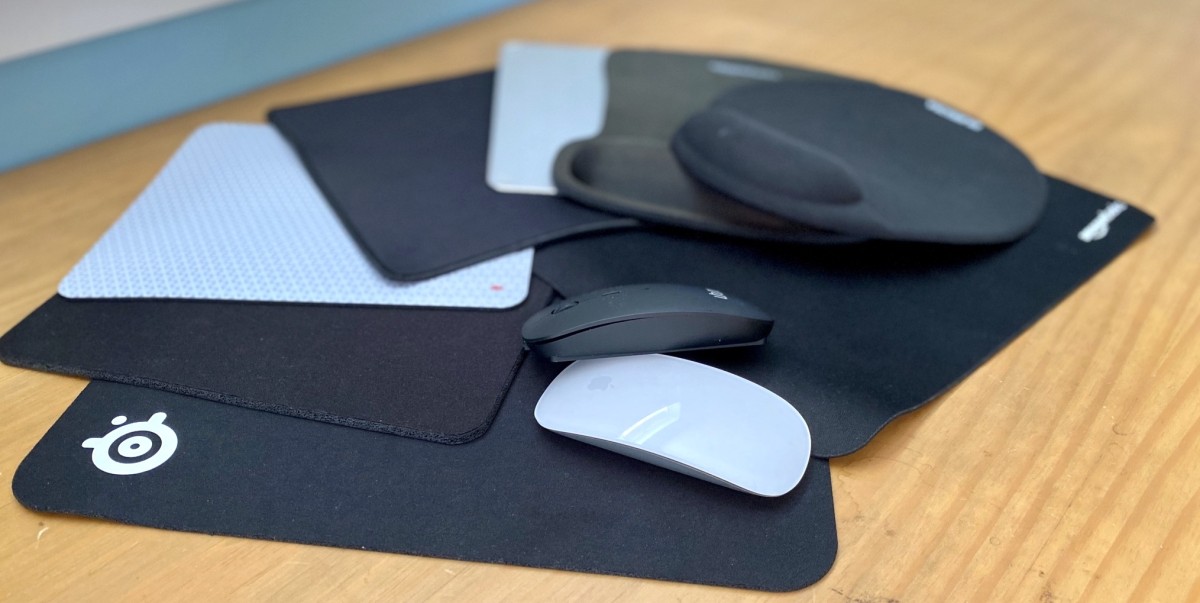
Mouse Pads with Wrist Support: Small investments that prevent strain.
These accessories don’t just enhance comfort—they maximize productivity in the perfect workstation on a budget.
Organizing Your Workspace Without Spending Much
Organization makes a workstation functional. Even on a budget, you can keep your desk clutter-free with simple solutions:
-
Storage Boxes: Use recycled containers for stationery.
-
Drawer Organizers: Cardboard dividers help separate items.
-
Wall Hooks: Hang headphones or bags instead of cluttering your desk.
-
Desk Mats: Affordable mats improve aesthetics while protecting surfaces.
A clean and organized setup feels more professional, even if you are working from a small space.
Productivity Psychology and Workstation Design
Did you know your environment affects your brain? Studies show that cluttered desks reduce focus, while clean workstations improve efficiency.
A few psychological principles that apply to the perfect workstation on a budget:
-
Color Psychology: Blue tones increase focus, green reduces stress, and yellow boosts creativity. Adding colored desk accessories is cheap but effective.
-
Minimalism: Fewer items on your desk reduce distractions.
-
Personalization: A small plant or framed photo boosts morale.
When building the perfect workstation on a budget, keep in mind that design isn’t just physical—it also affects your mental state.
The Role of Lighting in Workstation Productivity
Lighting plays a crucial role in creating the right mood for work. Poor lighting causes eye strain, headaches, and fatigue. Fortunately, you don’t need expensive fixtures.
-
Natural Light: Position your desk near a window to take advantage of sunlight.
-
Budget LED Lamps: Affordable lamps with adjustable brightness are widely available.
-
Warm vs. Cool Light: Warm light relaxes, while cool light enhances focus. A mix of both is ideal.
Small lighting changes make your perfect workstation on a budget feel premium without overspending.
Workstation Setups for Different Needs
The ideal workstation varies depending on your work. Let’s explore examples:
1. Student Setup
-
Compact desk
-
Affordable chair with back support
-
Second-hand laptop stand
-
Desk lamp for late-night study sessions
2. Freelancer Setup
-
Foldable desk to save space
-
Budget external monitor for multitasking
-
Noise-canceling headphones
-
Cable organizers
3. Gamer Setup
-
Cooling laptop stand
-
Budget gaming chair alternative with cushions
-
LED lighting strips for ambience
-
External keyboard and mouse
4. Corporate Remote Setup
-
Dual monitors from resale shops
-
Adjustable chair with added cushions
-
Docking station for smooth workflow
-
Organized filing solutions
Each example proves that the perfect workstation on a budget adapts to your lifestyle.
Long-Term Benefits of Budget-Friendly Workstations
Some believe that spending less means compromising quality. But a smartly designed workstation provides long-term advantages:
-
Health Savings: Preventing back pain saves money on physiotherapy.
-
Higher Output: Better productivity can lead to career growth.
-
Sustainability: DIY solutions often reuse items, reducing waste.
-
Scalability: You can upgrade over time without starting from scratch.
Thus, the perfect workstation on a budget provides both immediate comfort and future value.
Mistakes to Avoid When Building a Budget Workstation
-
Buying cheap items that break quickly instead of durable budget options.
-
Ignoring ergonomics in favor of aesthetics.
-
Overloading your desk with unnecessary gadgets.
-
Forgetting about proper lighting and airflow.
Avoiding these ensures your perfect workstation on a budget stays both functional and stylish.
Future of Budget-Friendly Workstations
The future of workstation design is exciting. With remote work growing, companies and individuals are investing in affordable solutions. Some future trends include:
-
Eco-Friendly Furniture: Made from recycled materials.
-
Smart Desks: Budget-friendly versions with height adjustments.
-
AI-Based Ergonomics: Apps that remind users to adjust posture.
-
Modular Furniture: Affordable pieces that can be rearranged easily.
These innovations will make the perfect workstation on a budget even easier to achieve.
Quick Tips Recap for Building the Perfect Workstation on a Budget
If you’re short on time but want a summary, here are the essentials:
-
Choose a sturdy but affordable desk, even second-hand.
-
Prioritize a supportive chair or add cushions for comfort.
-
Use laptop stands or DIY risers for posture correction.
-
Improve lighting with natural light or budget LED lamps.
-
Keep cables neat using clips, ties, or simple organizers.
-
Personalize your desk with plants, photos, or low-cost decor.
Conclusion
Building the perfect workstation on a budget is all about balance. You don’t need luxury furniture to be productive—you need creativity, smart choices, and focus on comfort. Even the smallest, affordable changes can transform your daily workflow, making every hour at your desk healthier, more efficient, and more enjoyable. The perfect workstation on a budget is not about spending less—it’s about spending smart. By prioritizing ergonomics, organization, lighting, and personalization, you can create a space that supports productivity and health without breaking the bank.
Whether you’re a student pulling all-nighters, a freelancer balancing multiple projects, or a professional working from home, the perfect workstation on a budget ensures you stay comfortable and focused. Start small, be creative, and watch your workstation transform into a productivity hub.



Leave A Comment