
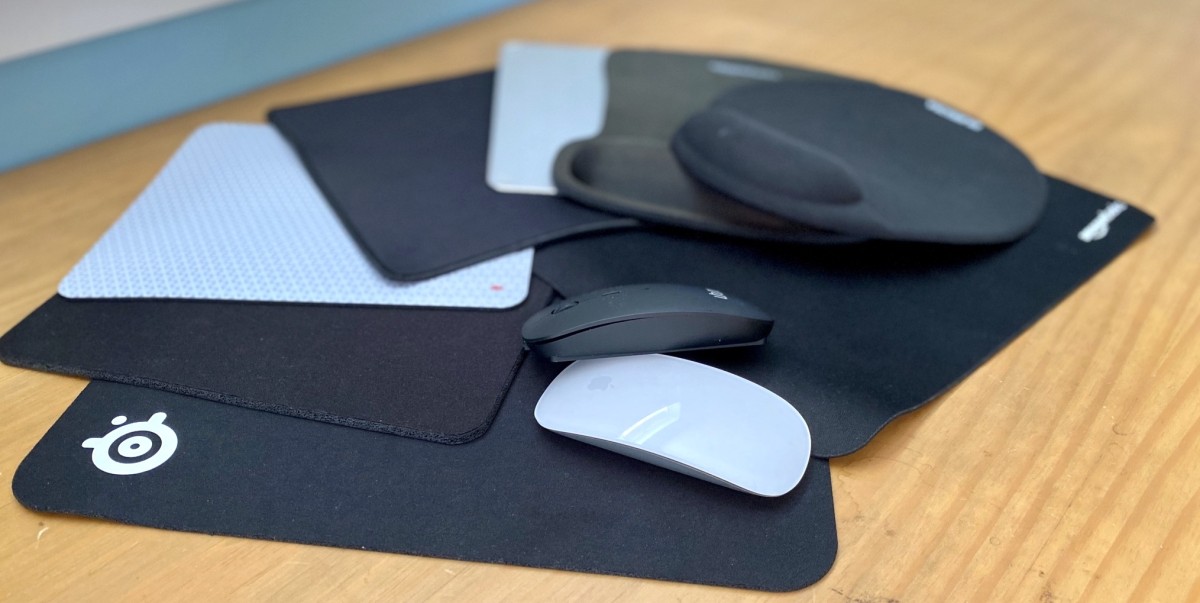
Introduction- by Wired Geekz
“Choosing the Right Mouse Pad” is more relevant in 2025 than ever before. Not only does the choice impact pointer accuracy and comfort, but it also affects hand health, productivity, and the overall feel of any desktop environment. This exhaustive guide unpacks every major consideration, including shape, materials, ergonomics, gaming features, sustainability, price, and care, ensuring that readers are empowered to make smart, lasting decisions for both personal and professional setups.
Why Mouse Pads Matter More Than Most People Realize
Selecting the right mouse pad might seem trivial at first, but it’s a quiet catalyst for comfort, speed, and health. Top-tier mouse pads create friction profiles tailored to both fast flicks and minute corrections. They minimize wrist fatigue during marathon workdays and amplify gaming performance during critical competitive moments.
Choosing the Right Mouse Pad is also about long-term maintenance—a durable pad can protect your desk surface and preserve mouse feet, while specialty pads integrate wireless charging or RGB lighting, blending utility and aesthetics.
Understanding the Fundamentals: Key Mouse Pad Features
Surface Material Breakdown
Mouse pads come in several core materials, each delivering unique characteristics. When “Choosing the Right Mouse Pad,” it is crucial to evaluate which fits your workflow:
-
Cloth Mouse Pads: These provide gentle friction for control-focused use. Soft and easily transportable, they excel in office settings and moderate gaming. They also allow for high accuracy at lower DPI and remain some of the most affordable choices.
-
Hard Mouse Pads: Built from plastic, metal, or glass, these pads support rapid movements and swift swipes, favored by esports players and graphic designers who need blazing speed. Hard surfaces offer easy cleaning but may show wear quickly if not properly cared for.
-
Hybrid Mouse Pads: Combining hard and soft elements, these pads use specialized woven cloth atop polyurethane or thin metallic bases to merge comfort and efficiency. They are gaining traction in 2025 as the ‘best of both worlds’ solution, often with water resistance for added durability.
Shape and Size: Making Every Movement Count
The ideal shape and size depends on intended use, desk space, and personal habits:
-
Standard Pads: Suited for travel, minimal setups, or users with limited mouse movement range.
-
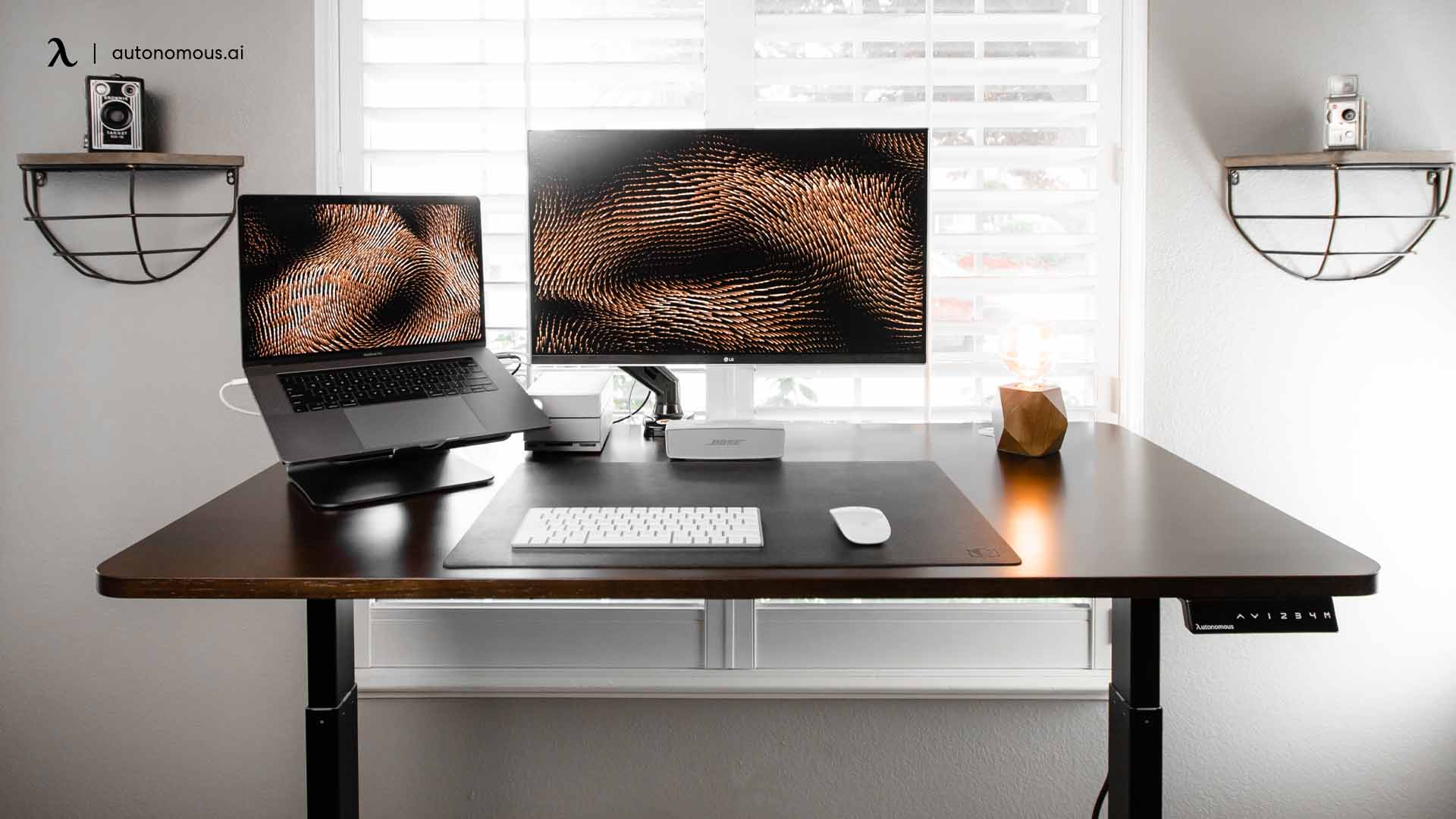
Extended Pads: Spanning both keyboard and mouse, these pads facilitate uninterrupted arm movement, which is ideal for gaming, digital drawing, and flexible office layouts.
-
Custom Shapes: Certain ergonomic pads and wrist rest models feature rounded contours, providing targeted comfort and support for users prone to wrist injury or strain.
Properly “Choosing the Right Mouse Pad” starts with measuring your available space and assessing mouse usage patterns.
Diving Deeper: Mouse Pad Base and Thickness
Grip and Stability
A mouse pad must remain stable during use. Non-slip rubber bases and siliconized undersides ensure secure placement. Pads with low-quality grip shift easily during frantic gaming or busy work hours, causing micro-movements that disrupt accuracy and flow.
Thickness and Cushioning
Heavily padded mouse pads (over 4mm thick) provide added wrist comfort and can lessen desk impact. Thin, rigid pads emphasize speed and near-zero friction. When “Choosing the Right Mouse Pad,” select thickness that aligns with ergonomic and performance needs, as well as desk material.
Edge Construction and Lifespan
Mouse pad edges are the first to fray or separate. Stitched edge pads, now common in 2025, prevent unraveling and extend lifespan dramatically. Laser-cut and heat-sealed edges are alternatives for seamless finishes. Unstitched soft pads may appeal for minimal look but usually require more frequent replacement.
Ergonomics and Health: Why Comfort Is Paramount
With many people working or gaming for extended periods, ergonomics play a pivotal role in “Choosing the Right Mouse Pad.” Pads with integrated gel or memory foam wrist rests help maintain neutral hand alignment, reducing risk for carpal tunnel or repetitive stress injuries.
-
Ergonomic Pads: Often include curved wrist rests, sloped transitions, or memory foam inserts. These pads minimize muscle tension and encourage healthy posture.
-
Height and Slope Adjustments: Some pads offer adjustable wrist rest height or incline to match chair and desk configuration.
Prioritizing ergonomics now means preventing discomfort and injury over years of use.
Innovation in Mouse Pad Design: What’s New in 2025
As technology leaps forward, mouse pads now offer advanced features:
-
Wireless Charging: Cutting-edge pads like the Logitech PowerPlay and Corsair MM1000 allow compatible mice to charge directly on the surface, freeing users from battery worries.
-
RGB Lighting: Syncs with gaming rigs, providing programmable light shows for ambiance or competition.
-
Antimicrobial Coatings: Crucial for shared office spaces or pandemic-era hygiene, these surfaces actively repel bacteria and make cleaning easier.
-
Water Resistance: Hybrid and certain hard pads feature sealed edges and specialty coatings to wick away spills, minimizing damage risk in dynamic environments.
When “Choosing the Right Mouse Pad,” innovative features can create a modern workspace or competitive gaming station—often with improved practical function beyond aesthetics.
Matching the Mouse Pad to Mouse Technology
Sensor Type
Precision tracking depends on sensor compatibility:
-
Optical Sensors: Work best on cloth, hybrid, or textured pads, minimizing jitter and ensuring low DPI accuracy.
-
Laser Sensors: Suit smooth, hard surfaces, which allow rapid cursor travel and facilitate high DPI performance.
Always consult manufacturer recommendations when “Choosing the Right Mouse Pad,” ensuring full compatibility for optimal sensor responsiveness.
Play Styles and Professional Applications
-
FPS Gaming: Extended, low-friction pads for broad arm sweeps.
-
MOBA and Strategy: Medium to high control pads balance clicks and quick pointer moves.
-
Design, Editing, and Drawing: Pads emphasizing stability and cleanliness, often combined with designer-favorite stylus or pen input, Choosing the Right Mouse Pad
Comparing Mouse Pad Brands and Models in 2025
Here is a comparison table of the leading mouse pads for different user scenarios, highlighting key features for “Choosing the Right Mouse Pad”:
| Mouse Pad | Material | Size | Features | Key Scenario |
|---|---|---|---|---|
| SteelSeries QCK Heavy | Cloth | Extend | Thick, stitched edges | Gaming, offices |
| Razer Strider Chroma | Hybrid | Large | RGB, water resistant | Gaming, creative work |
| Logitech G PowerPlay | Hard | Medium | Wireless charging, durable | Professional, home |
| Corsair MM800 Polaris | Plastic | Standard | RGB, USB pass-through | Multi-device setups |
| Artisan Zero | Polyester | Large | Stitched, ultra durable | Esports, pro gaming |
| Cooler Master MP510 | Fabric | Compact | Water resistant, budget | Students, travel |
Personalizing Your Mouse Pad Experience
Think of choosing a mouse pad as designing part of your workspace. While “Choosing the Right Mouse Pad,” factor in color, branding, and personal touches such as custom prints, favorite game graphics, company logos, or family photos. Some brands offer bespoke printing or modular accessories (skins, wrist rests) for further customization, Choosing the Right Mouse Pad.
Sustainability in Mouse Pad Manufacturing
Eco-conscious consumers often seek environmentally friendly pads. Models manufactured from recycled polyester, natural rubber, or biodegradable foam help minimize environmental impact. These pads are durable and support global efforts toward sustainable production.
When “Choosing the Right Mouse Pad,” considering sustainability brings lasting benefits, supporting responsible production and longer-term pad use.
Maintenance and Care: Extend Your Pad’s Life
Proper care preserves pad performance and hygiene:
-
Cloth Pads: Hand-wash gently with dish soap; avoid harsh scrubbing or hot water. Air-dry flat.
-
Hard Pads: Wipe with a soft cloth or gentle cleaner, avoiding abrasive pads.
-
Hybrid/Water-resistant Pads: Cleanse with mild soap; many tolerate a gentle shower rinse.
Routine cleaning prevents buildup of skin oils, dust, and food particles, ensuring sensors perform optimally and extending pad lifespan.
Frequently Asked Questions about Choosing the Right Mouse Pad
Q1: Can a good mouse pad improve gaming performance?
A: Yes. Proper friction and pad size allow for more accurate tracking and faster, more consistent responses—particularly in competitive gameplay, Choosing the Right Mouse Pad a vital role.
Q2: How often should I clean my mouse pad?
A: Every 2–4 weeks for cloth or hybrid pads, more frequently for high-use or shared environments. Hard pads require less frequent cleaning.
Q3: What is the best thickness for an ergonomic mouse pad?
A: For wrist support, opt for pads measuring 3mm–5mm with memory foam rests. Thin pads (<2mm) are advised for speed-centric users.
Q4: Do gaming mouse pads work well for office and design use?
A: Yes—gaming pads often provide durability, stitched edges, and large surface area, supporting extended tasks and stylus work.
Q5: Is RGB lighting purely cosmetic?
A: Primarily, yes, but configurable lighting can improve workspace visibility during night sessions and signal game events in some competitive models.
Common Mistakes to Avoid When Choosing the Right Mouse Pad
-
Ignoring desk size: Measure space before purchase to avoid overhang or wasted surface.
-
Choosing only for style: Prioritize material, shape, and health features to match your needs.
-
Overlooking sensor compatibility: Ensure your mouse’s sensor matches the surface for accurate results.
-
Underestimating maintenance: Dirty pads impair tracking and promote hand irritation; clean regularly.
User Scenarios and Recommendations
For Home Office Workers
Opt for mid-sized cloth pads with wrist rests and stitched edges. Prioritize comfort and desk fit when “Choosing the Right Mouse Pad,” and choose neutral colors for a professional workspace.
For Students and Travelers
Compact, water-resistant pads that roll up easily fit dynamic lifestyles. Look for budget models with rubberized bases for impromptu work sessions wherever you are.
For Gamers
Go large! Extended hybrid pads with RGB lighting and stitched edges suit fast-paced play. Customize with a favorite team color or logo when “Choosing the Right Mouse Pad.”
For Graphic Designers and Creators
Pads with smooth, easily cleaned surfaces and high stability, such as the Artisan Zero, foster relentless workflow without friction or interruptions.
The Future of Mouse Pad Technology
Expect even more wireless integration, haptic feedback surfaces, advanced materials (nano-fiber), anti-fatigue wrist rests, and smart pad sensors to track usage patterns in coming years. “Choosing the Right Mouse Pad” will only grow in sophistication as workspaces evolve.
Mouse Pad Innovations: Technology and Market Trends in 2025
The humble mouse pad is now a hub of technological advancement. In 2025, smart mouse pads combine traditional surface functionality with progressive digital capabilities. Wireless charging stations are integrated directly into the pad, revolutionizing how users keep mobile devices powered—eliminating clutter and supporting seamless work and play. As part of “Choosing the Right Mouse Pad,” evaluating these smart features can enhance productivity, especially in multi-device workflows common in modern offices and gaming setups.
Some next-generation mouse pads offer haptic feedback, providing users with tactile signals during gaming or multimedia editing. This innovation brings immersive depth to digital interactions, aiding careful cursor movement or alerting users with subtle vibrations for notifications. Designers, gamers, and even video editors can experience a more intuitive connection to their work thanks to these new options.
Ergonomic design is evolving, too. New models employ materials that react to body heat and pressure, adjusting support over time to maintain wrist health. Advanced wrist rest technology, including memory foam and adaptive silicone, offers personalized comfort, which is essential when “Choosing the Right Mouse Pad” for professionals who spend long hours at the computer. Some brands, such as Artisan and Logitech G, also integrate biometric security into luxury models—fingerprint sensors prevent unauthorized use, especially desirable in corporate or shared environments.
Market Expansion, Personalization, and User Interactivity
Mouse pads have emerged as branding tools, with companies using them for promotional gifts at conferences and integrating user-driven customization. Personalized graphics, corporate logos, and even user-uploaded artwork can cover the surface, turning mouse pads into vibrant reflections of personality or business identity.
For gamers and eSports professionals, large, extended pads that blanket entire desks have become the standard. These pads support expansive and uninterrupted movements, accommodating the quick flicks needed for precision in competitive titles. Specialized surface textures are engineered to respond to high-sensitivity gaming mice, emphasizing speed or control based on preferred play style.
Global sales forecasts predict the smart and gaming mouse pad market will double over the next decade, driven by increased demand for ergonomic comfort, sensor precision, and extended usage. Asia-Pacific and North America are expected to lead the market due to high rates of technology adoption and rapidly expanding gaming communities.
Integration With Smart Devices and the IoT
The convergence of smart home technology and peripherals means mouse pads in 2025 may sync with lighting, speakers, and even temperature controls. IoT-connected pads can relay usage data, remind users to take ergonomic breaks, or trigger ambient lighting changes to support focus and relaxation. Augmented reality features are also being piloted—mouse pads interact with compatible cameras and displays to enhance the creative workspace, bringing virtual objects onto the surface for true digital-meets-physical collaboration.
Market growth is anticipated in both commercial and residential applications, with segmentation tailored to office automation, smart gaming, and home productivity. This versatility underscores the value in “Choosing the Right Mouse Pad” not only as a comfort or control device but as a central hub for workstation intelligence.
Outlook: Sustainability and Accessibility in Mouse Pads
Manufacturers increasingly prioritize eco-friendly materials such as recycled polyester, sustainable natural rubber, and biodegradable foam. These pads last longer and reduce environmental impact, aligning with buyer values for sustainability and responsible consumption.
Accessibility improvements—like larger pads for people with motor challenges and pads with high-contrast markings for visually impaired users—make choosing a mouse pad in 2025 inclusive for everyone.
These advancements make “Choosing the Right Mouse Pad” a more exciting, personalized, and strategic decision than ever—ensuring every user can find the ideal blend of innovation, comfort, and style.
Conclusion: Making Your Final Choice
Every user deserves a mouse pad that mirrors their unique style and workflow. By carefully weighing material, shape, size, ergonomic features, and maintenance needs, anyone can find the perfect fit—a pad that boosts accuracy, protects health, and enhances the look and feel of any desk environment.
With the right pad under your hand, every task becomes smoother and every click more rewarding. Don’t settle for less—take control of your workspace, protect your comfort, and embrace the best in modern mouse pad technology.



Leave A Comment