Introduction- by Wired Geekz
In today’s digital world, laptops are our constant companions. Students rely on them for assignments, professionals use them for office work, and gamers spend hours in front of them for entertainment. While laptops are convenient, their flat design forces us to hunch over screens, leading to poor posture and discomfort. Over time, this habit causes neck pain, back issues, and eye strain.
This is where ergonomic laptop stands make a real difference. They are designed to raise your laptop to eye level, align your posture, and create a healthier working environment. Far from being a luxury, these stands are becoming a necessity for anyone who spends significant time on a laptop.
In this blog, we’ll dive deep into what makes ergonomic laptop stands so effective, explore their benefits, discuss the different types available, and share practical tips on choosing the right one. By the end, you’ll understand why investing in one could be the smartest decision for your health and productivity.
What Are Ergonomic Laptop Stands?
An ergonomic laptop stand is a specially designed accessory that elevates your laptop screen to the ideal height. Unlike basic stands or simple props, these stands are built with human ergonomics in mind. Their purpose is not only to make your desk look organized but also to help you maintain proper posture while working.
When you place your laptop on a flat desk, your natural tendency is to bend forward. This strains the neck, shoulders, and spine. By using ergonomic laptop stands, your screen height matches your eye level, and your wrists stay at a neutral angle while typing. This improves both comfort and efficiency.
Many stands also include adjustable height settings, ventilation features, and foldable designs. This makes them versatile for different settings, whether at home, in the office, or on the go.
Why Posture Matters in Daily Laptop Use
Most people underestimate the impact of posture until discomfort becomes chronic. Sitting with a bent spine or hunched shoulders might feel harmless at first, but over time, it can lead to:
-
Persistent neck pain
-
Shoulder stiffness
-
Headaches from muscle tension
-
Lower back issues
-
Wrist pain due to awkward typing
Correct posture ensures that your body weight is evenly distributed. When your screen is at eye level and your back is straight, you reduce unnecessary strain on your muscles. Ergonomic laptop stands encourage this alignment naturally.
Posture also affects productivity. Studies show that good posture increases focus, reduces fatigue, and even boosts confidence. That means using the right stand doesn’t just protect your health—it also enhances your performance.
Benefits of Ergonomic Laptop Stands
1. Comfort That Lasts All Day
The biggest benefit of ergonomic laptop stands is comfort. By lifting your screen, they prevent you from bending your neck down. This seemingly small change dramatically reduces discomfort during long hours of work or study.
2. Enhanced Productivity
When your body is comfortable, your mind can focus better. Distractions caused by aches and pains disappear, letting you immerse yourself in tasks. Professionals often report higher efficiency after switching to ergonomic laptop stands.
3. Prevention of Long-Term Health Issues
Poor posture leads to chronic conditions like cervical spondylosis and carpal tunnel syndrome. Investing in ergonomic laptop stands today prevents these issues tomorrow, saving you from expensive medical treatments.
4. Improved Laptop Performance
Many stands feature open designs that allow heat to escape. Since laptops generate significant heat during use, especially while gaming or multitasking, these stands improve airflow and prevent overheating.
5. Portability and Style
Modern ergonomic laptop stands are designed to be lightweight and foldable. You can carry them to coffee shops, libraries, or workplaces. Some models even double as stylish desk accessories, adding to your workspace aesthetics.
Types of Ergonomic Laptop Stands
Not all stands are the same. Depending on your needs, you can choose from different types of ergonomic laptop stands:
-
Adjustable Stands – Offer multiple height and angle settings. Perfect for users who switch between sitting and standing.
-
Foldable Stands – Compact, portable, and easy to carry in a backpack. Ideal for students and remote workers.
-
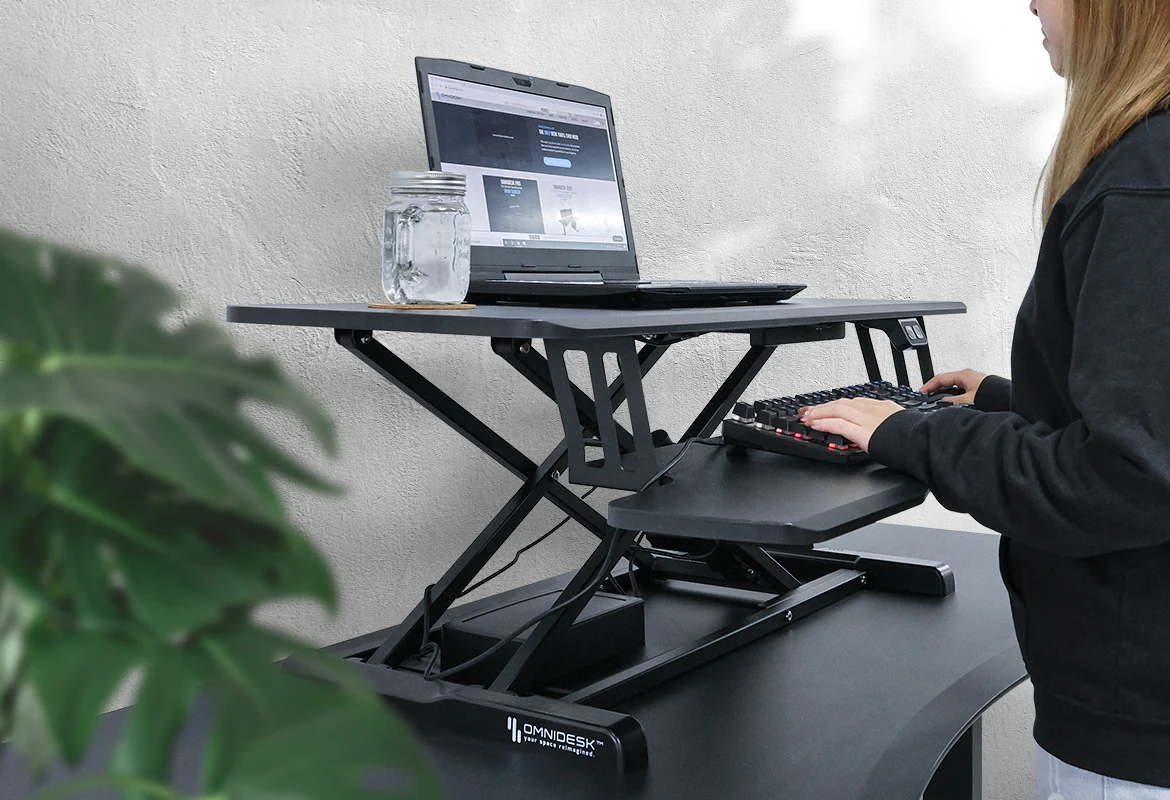
Standing Desk Converters – Larger setups that turn any desk into a standing workstation. Great for professionals who prefer standing while working.
-
Cooling Stands – Equipped with fans or ventilation grids that keep laptops cool during heavy use. Essential for gamers and designers.
-
Wooden or Metal Stands – Durable and stylish options that blend into different workspace themes.
Each type of ergonomic laptop stand caters to specific lifestyles, so it’s important to choose one that matches your daily routine.
How to Choose the Right Ergonomic Laptop Stand
When buying ergonomic laptop stands, here are the main factors to consider:
-
Height Adjustability: Ensure it raises your laptop to your eye level.
-
Build Quality: Choose strong materials like aluminum or reinforced plastic.
-
Weight Capacity: Check if it can hold your laptop’s size and weight.
-
Portability: Foldable models are perfect for people who travel often.
-
Ventilation: An open or fan-based design prevents overheating.
-
Budget: Prices vary, but investing in quality ensures durability.
Remember, the goal is to support your health and comfort. Spending a little extra for a sturdy ergonomic laptop stand often pays off in the long run.
Do Ergonomic Laptop Stands Really Work?
Many people wonder if these stands are just another tech trend. The truth is that ergonomic laptop stands are backed by science. Ergonomics is a field that studies human efficiency in working environments. By following ergonomic principles, these stands reduce strain, improve posture, and increase comfort.
Users often report noticeable changes within days of switching. Neck pain subsides, typing becomes easier, and sitting for long hours feels less exhausting. For those who work 6–8 hours daily on laptops, the difference is transformative.
Real-Life Use Cases
-
Students: Long study sessions become manageable, reducing stress on the back and neck.
-
Remote Workers: A home office setup feels more professional and less tiring.
-
Gamers: Extended gaming marathons are more comfortable, with better screen alignment and cooling.
-
Designers and Coders: Precision tasks become easier with improved focus and posture.
Maintenance and Care Tips
Ergonomic laptop stands are low-maintenance, but a little care keeps them in top condition:
-
Wipe with a soft cloth to remove dust.
-
Avoid placing heavy objects beyond their weight limit.
-
For foldable stands, store them properly to avoid damage.
-
If your stand has fans, clean them occasionally to prevent dust buildup.
With minimal effort, your stand can last for years while supporting both your laptop and your health.
Why Ergonomic Laptop Stands Are Worth Every Rupee
Some users hesitate due to cost, thinking they can manage without a stand. But consider the expenses of physiotherapy, medications, or treatments caused by bad posture. Compared to those costs, ergonomic laptop stands are inexpensive investments that offer long-term returns.
They also enhance your productivity, which indirectly increases your earning potential. Better focus, reduced fatigue, and healthier working habits are invaluable benefits.
Future of Ergonomic Work Accessories
As remote work and digital learning continue to grow, ergonomic tools are gaining popularity. Future designs of ergonomic laptop stands are expected to be even more lightweight, eco-friendly, and multifunctional. Some upcoming models may integrate wireless charging pads, adjustable lighting, or smart sensors to track posture.
This evolution shows that ergonomics isn’t a passing trend—it’s the future of healthier workplaces.
Common Mistakes Laptop Users Make Without Ergonomic Stands
Many laptop users don’t realize how their daily habits impact health. Without ergonomic laptop stands, people often:
-
Place laptops directly on their laps, causing overheating and poor posture.
-
Work long hours with bent necks, leading to chronic strain.
-
Use random objects like books or boxes to lift laptops, which are unstable.
-
Ignore wrist angle, increasing the risk of carpal tunnel syndrome.
These mistakes seem minor but accumulate over months and years. By switching to ergonomic laptop stands, users can instantly correct these issues.
Expert Opinions on Ergonomics
Health experts emphasize the importance of ergonomics in preventing workplace injuries. According to physiotherapists, proper screen alignment reduces neck strain by more than 50%. Occupational therapists also highlight that using ergonomic laptop stands encourages micro-movements, which prevent stiffness.
Corporate wellness programs increasingly recommend ergonomic accessories as part of a healthy work setup. This shows that companies view them not as luxuries but as necessities.
Ergonomic Laptop Stands vs. Traditional Stands
Some users ask, “Why not just use a normal laptop stand?” The difference lies in design.
-
Traditional Stands: Basic elevation, often fixed height, no focus on posture.
-
Ergonomic Laptop Stands: Adjustable, lightweight, designed to align body and screen.
While traditional stands may improve airflow, they fail to address posture and long-term health. Ergonomic laptop stands combine both benefits, making them more effective.
How Ergonomic Laptop Stands Affect Eye Health
Looking down at a laptop screen for long periods strains the eyes. Symptoms include:
-
Dryness and irritation
-
Headaches
-
Blurred vision
-
Increased fatigue
By lifting the screen to eye level, ergonomic laptop stands reduce downward gaze and minimize strain. Pairing them with proper lighting further protects eye health.
Ideal Workstation Setup with Ergonomic Laptop Stands
To maximize benefits, combine your stand with other ergonomic accessories:
-
External Keyboard and Mouse – Keep wrists straight and relaxed.
-
Adjustable Chair – Maintain a 90-degree angle at your knees.
-
Footrest – Prevents dangling legs and supports circulation.
-
Monitor Arm (if dual screens) – Ensures even alignment.
-
Proper Lighting – Avoid glare and protect eyes.
Together, these create a workstation that minimizes health risks and maximizes productivity.
Best Practices for Using Ergonomic Laptop Stands
-
Adjust the stand so the top of the screen is at or slightly below eye level.
-
Keep your elbows close to your body when typing.
-
Take breaks every 30–40 minutes to stretch.
-
Switch between sitting and standing if your stand allows.
-
Use proper lighting to reduce eye strain.
Following these tips ensures you get the full benefit of ergonomic laptop stands.
Popular Brands Offering Ergonomic Laptop Stands
The market offers a wide range of options. Some well-known brands include:
-
Portronics – Affordable and reliable models for everyday users.
-
Zebronics – Known for foldable and durable stands.
-
Dyazo – Offers lightweight yet sturdy ergonomic laptop stands.
-
STRIFF – Compact designs popular among students.
-
DailyObjects – Stylish stands with premium finishes.
Each brand has unique features, so the best choice depends on budget and personal preference.
Ergonomic Laptop Stands for Different User Groups
For Students
Lightweight and foldable models are best, as students often move between home, library, and campus.
For Professionals
Adjustable stands with solid build quality ensure comfort during long workdays.
For Gamers
Cooling stands with strong airflow are ideal to maintain laptop performance during extended gaming.
For Creators and Designers
Stable stands with wide adjustment angles help with precision tasks like video editing or graphic design.
Myths About Ergonomic Laptop Stands
-
“They are too expensive.” – Many affordable options are available under ₹1,000.
-
“A pillow or box works just as well.” – Unsafe and unstable, lacking ergonomic design.
-
“Only office workers need them.” – Students and gamers also benefit from ergonomic laptop stands.
-
“They are hard to carry.” – Most modern stands are foldable and portable.
Busting these myths helps people understand why ergonomic laptop stands are practical for everyone.
Frequently Asked Questions
Q1. Do ergonomic laptop stands fit all laptop sizes?
Yes, most stands are universal, but always check size compatibility.
Q2. Can I type directly on the laptop while it’s on the stand?
It’s possible, but using an external keyboard and mouse is better for wrist alignment.
Q3. Are cooling fans noisy?
Quality stands have silent fans that improve airflow without disturbance.
Q4. Do ergonomic laptop stands really improve productivity?
Yes. Reduced strain leads to longer focus and improved efficiency.
Q5. Are they durable?
Good-quality ergonomic laptop stands last for years with proper care.
Final Thoughts
The digital lifestyle is here to stay. Whether studying, working, or gaming, people spend more hours than ever in front of laptops. Ignoring ergonomics today means facing health issues tomorrow. By adopting ergonomic laptop stands, you not only improve your posture but also enhance focus, efficiency, and long-term well-being.
They may seem like small accessories, but their impact on health and productivity is huge. Instead of viewing them as optional, treat them as essential. After all, your comfort and health are priceless.
Conclusion
Ergonomic laptop stands are far more than stylish desk accessories. They are essential tools that protect your health, improve your productivity, and make long hours of laptop use bearable. Whether you are a student burning the midnight oil, a professional working from home, or a gamer enjoying long sessions, these stands are worth the investment.
By aligning your posture, reducing strain, and enhancing laptop performance, ergonomic laptop stands prove their value daily. Instead of treating pain later, prevent it now by upgrading your setup.



Leave A Comment